For pergola manufacturers and dealers

Pergola software: design it, price it, send it to production.

CRK Yazılım's pergola software runs the whole job on the same data: from the 3D design made in front of the customer to the quote, the bill of materials and cut list, the production plan and the shipment. Small workshops can start with XERP 3D; add TCRK XERP to run the factory.

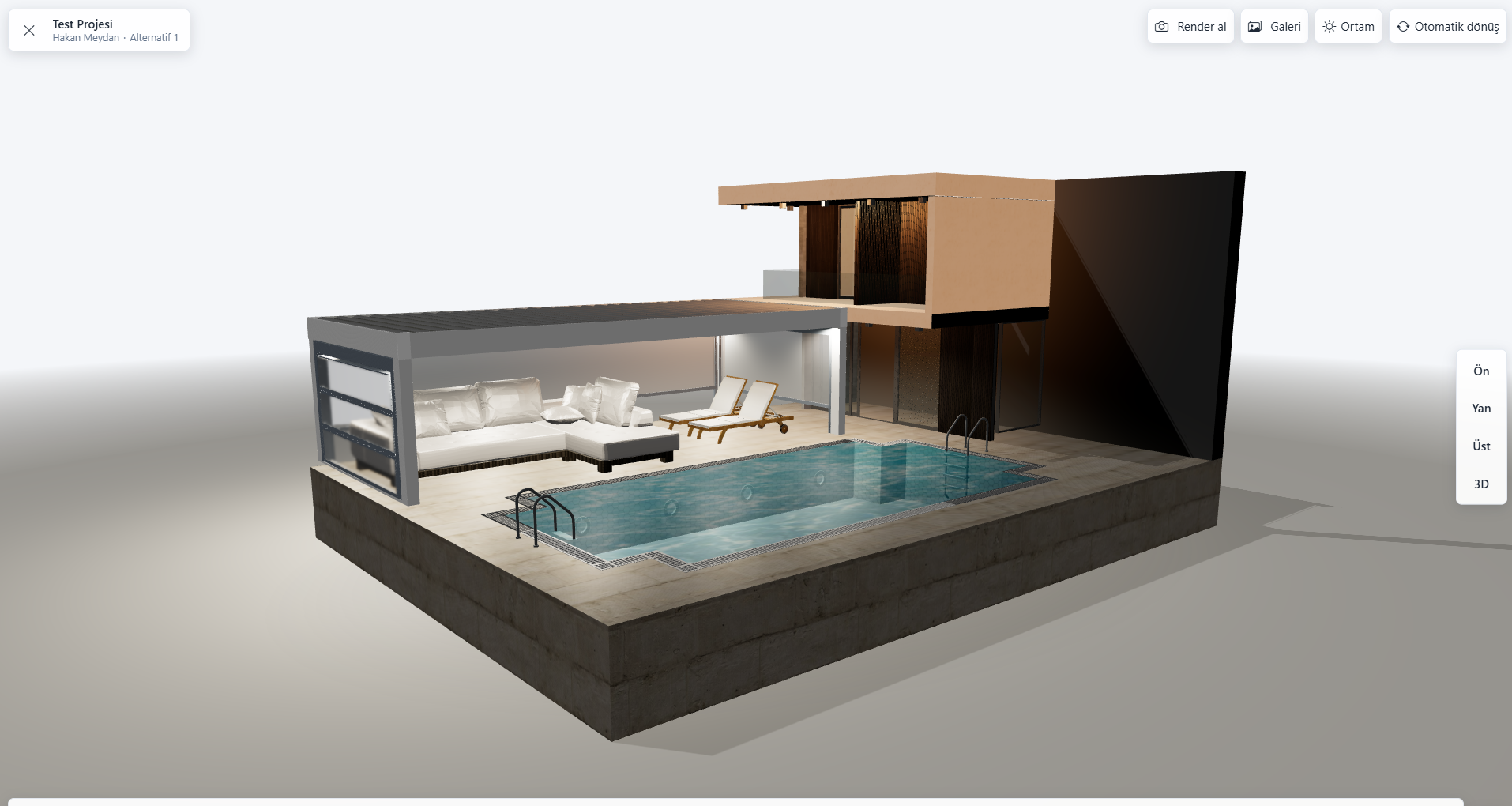
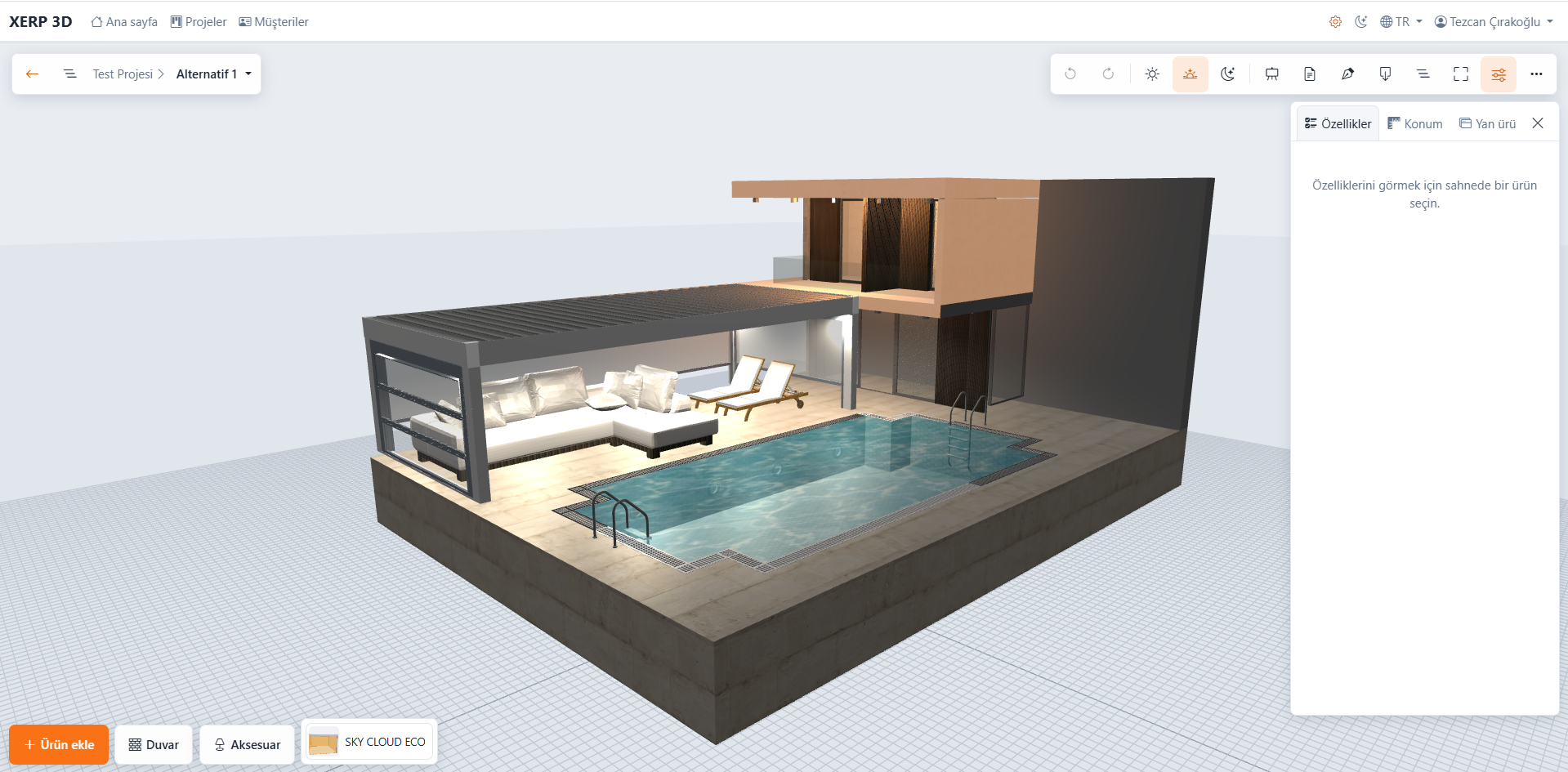
Bioclimatic pergola with glass panels and sun and shadow settings in the XERP 3D pergola software presentation mode
  • 3D design
  • Instant pricing
  • PDF quotes
  • Automatic BOM
  • Cutting optimization
  • Production planning

Pergola software is industry-specific software that lets pergola and bioclimatic pergola companies design products in 3D, price them by size and options, generate the bill of materials and cut list, and manage production. CRK Yazılım offers this in two products: the 3D configurator XERP 3D and the manufacturing ERP TCRK XERP.

What it does

What does pergola software do?

Instead of separate files for drawings, prices, BOMs and production, the same pergola data carries through every step on its own.

Design

Pergola design software: design in 3D and change it in front of the customer.

Pick the product from the catalog and enter sizes and options; the model rebuilds instantly. Glass, zip screens and sliding systems fit the openings on their own.

  • Parametric pergola model and multi-product project scene
  • Photorealistic presentation mode that also works on tablets
  • Photorealistic rendering with path tracing
  • Augmented reality (AR) on iPhone, iPad and Android
Explore 3D pergola design
Two pergolas side by side with glass add-ons in the XERP 3D pergola design software
Pricing and quotes

Pergola pricing and quoting software.

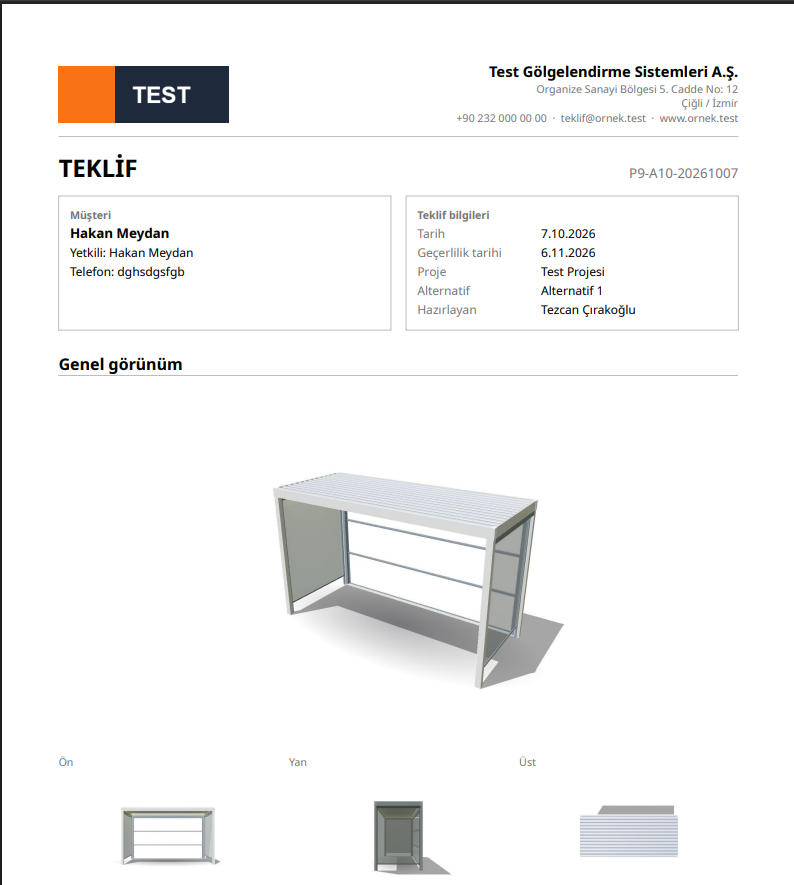
The price is calculated from your own catalogs by size and options. When the design is finished, the priced quote is ready to present in the same meeting.

  • Instant pricing from your own price catalogs
  • One-click multi-language PDF quotes
  • Dealer and sales rep roles
See pricing and quoting
Priced quote generated automatically from the design in pergola software
Technical office

Pergola BOM, cutting and technical drawing software.

The technical office doesn't redraw the pergola you sold. The BOM, cut list and A3 technical drawing come straight from the design and the answers to your product questions.

  • Automatic multi-level bill of materials
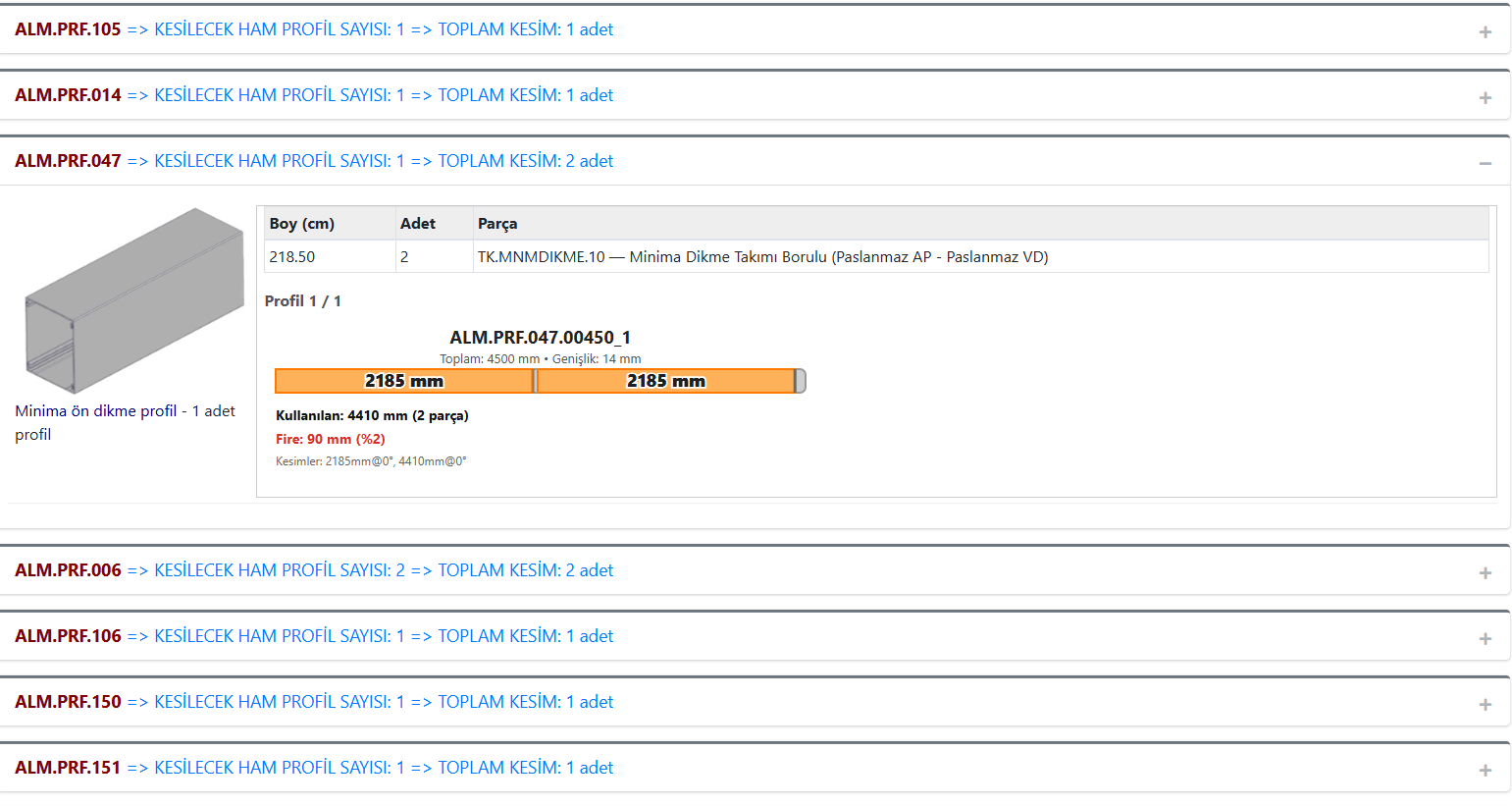
  • Cutting optimization and cut list
  • Excel and PDF output for BOM and cut list
  • A3 technical drawing with title block (DXF and PDF)
See BOM and cutting
Automatic cutting optimization and cut list in pergola software
Factory

Pergola manufacturing software: from order to shipment.

TCRK XERP turns the approved order into a manufacturing project; planning, the shop floor, crating and shipping all run on the same record.

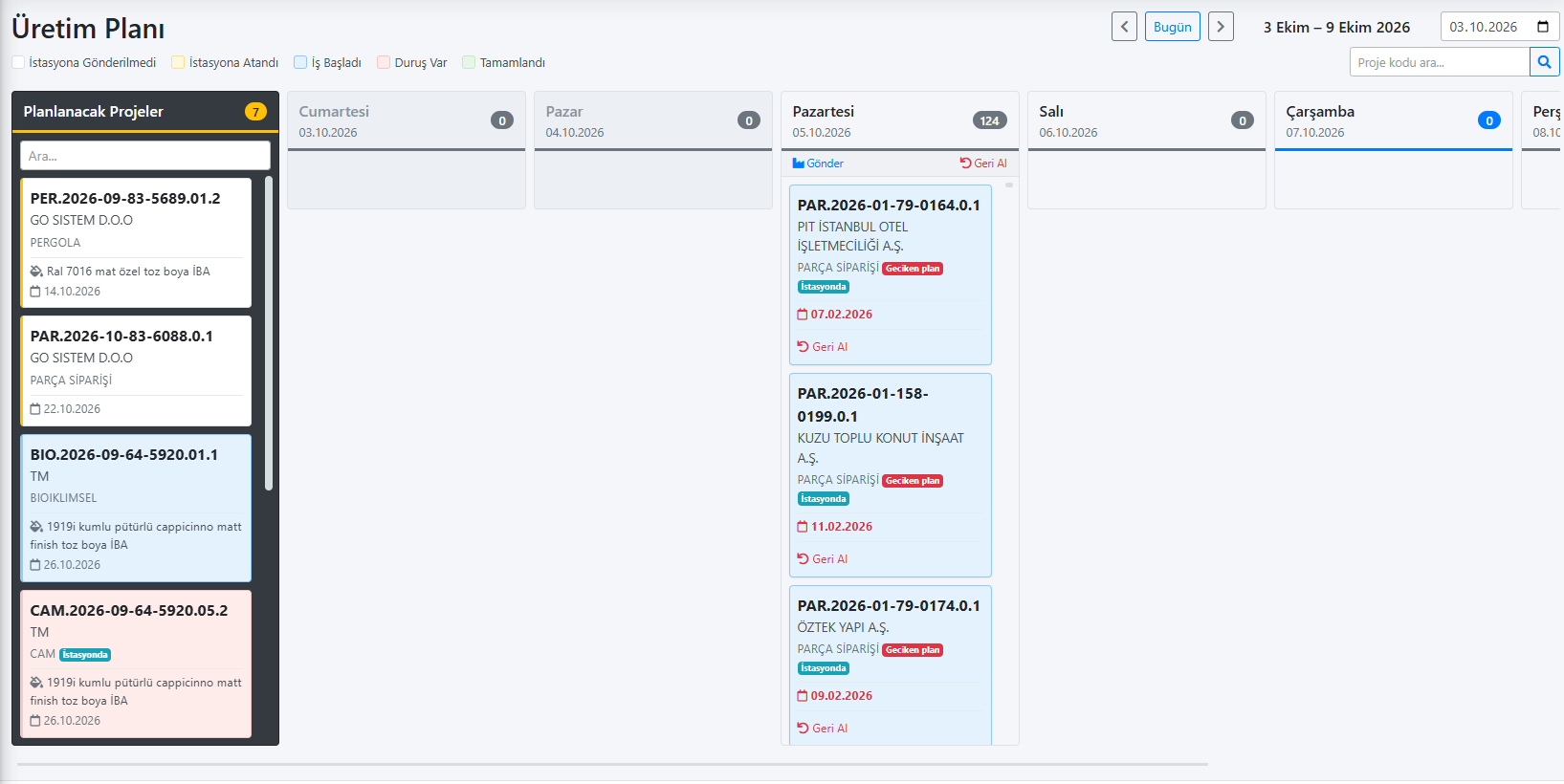
  • Weekly plan and Gantt production planning
  • Unlimited workstations and free routing
  • Shop-floor tablets and live production tracking
  • Crating, loading, purchasing and finance
Explore production planning
Production plan screen in the TCRK XERP pergola manufacturing software
The difference

Why pergola software instead of Excel and general CAD tools?

Pergolas are made to measure; every order has its own drawing, price, BOM and cut sizes. That is where industry-specific software makes the difference.

NeedExcel and general CAD toolsPergola software
Size changesThe drawing is reworked by handThe parametric model rebuilds instantly
Pricing and quotesCalculated by hand in a separate sheetInstant pricing and PDF quotes from your catalogs
BOM and cuttingPrepared again by the technical officeAutomatic BOM and cutting optimization from the design
Customer presentationFlat drawings or a separate render toolPhotorealistic rendering and augmented reality
Production trackingSeparate files and paper work ordersGantt, workstation tablets and live tracking
New · AI

Don't enter your product catalog by hand. Hand over your Excel and DXF files and let AI set it up.

The Product Designer in TCRK XERP reads the Excel file you use in production and the product's DXF technical drawings. It defines the product in the system, builds its BOM and sets up the technical drawing to draw itself from the dimensions.

  • Presents an analysis report first and writes once you approve
  • Tests the drawing and BOM itself and reports the result
  • Changes written to a card are versioned and can be rolled back
  • Final review and fine-tuning stay with your technical team
You provide
  • Production Excel (.xlsx, .xlsm)
  • DXF technical drawings
TCRK XERP
AI-powered Product Designer
The system gets
  • Product questions and calculated values
  • Missing stock cards
  • Formula-driven BOM
  • Technical drawings generated from dimensions
Two products, three paths

Which pergola software is right for you?

Start small and expand as you grow. XERP 3D runs sales, quoting and the technical office on its own; TCRK XERP runs the factory; together they build One Chain from drawing to truck.

Standalone

XERP 3D

Small and medium-sized manufacturers, dealers

Draw, price, and generate your BOM and cut list — no ERP needed.

  • 3D design, photorealistic renders, AR
  • Instant pricing and PDF quotes from your own price catalogs
  • Stock cards and configuration questions
  • Automatic BOM and cutting optimization (Excel / PDF)
  • A3 technical drawing with title block (DXF / PDF)
  • Dealer and sales team management
Explore XERP 3D
Standalone

TCRK XERP

Factories managing production at scale

Make sure every sales promise is one the factory can build.

  • AI product setup from Excel and DXF
  • Quotes, approval stages and orders
  • Manufacturing projects and automatic BOM
  • Weekly plan, Gantt, workstations and routing
  • Shop-floor tablets and live production tracking
  • Crating, loading and shipping
  • Purchasing, finance and human resources
See the factory modules
Together · One Chain

XERP 3D + TCRK XERP

Manufacturers who want full control from sale to shipment

The same data from drawing to truck.

  • The drawing made in front of the customer goes straight into the order
  • The order goes to manufacturing together with its BOM
  • Work orders go to workstation tablets
  • One record all the way to crating and shipping
  • The same information is never re-entered at any step
Explore One Chain
Product families

Which products is it used for?

Product families, brands, series and questions are defined entirely by you. Typical use:

  • Bioclimatic pergolas
  • Aluminum pergolas
  • Awning systems
  • Guillotine glass
  • Sliding glass
  • Zip screens
  • Fixed glass and panels
  • Closures between products
  • LED lighting
Frequently asked questions

Common questions

Do I have to enter my product catalog by hand?

No. The AI-powered Product Designer in TCRK XERP reads the Excel file you use in production and the product's DXF technical drawings. It creates the product questions, missing stock cards and a formula-driven BOM, and sets up the technical drawing to draw itself from the dimensions. It presents an analysis report first and writes to the system once you approve; final review stays with your technical team.

What is pergola software?

Pergola software is industry-specific software that lets pergola manufacturers and dealers design products in 3D, price them, prepare quotes, generate the bill of materials and cut list, and manage production. CRK Yazılım's pergola software products are XERP 3D and TCRK XERP.

How do I choose the best pergola software?

Check whether the drawing updates on its own when sizes change, whether prices come from your own catalogs, whether the BOM and cut list are generated from the design, and whether the software connects to production. Trying these with your own product in a demo is the most reliable test.

Can it be used as pergola design software?

Yes. XERP 3D designs the pergola parametrically in 3D by size and options, places glass, zip screens and sliding systems in the openings, and produces photorealistic renders and A3 technical drawings with a title block (DXF and PDF).

Does pergola software calculate prices and quotes automatically?

Yes. XERP 3D calculates the price instantly by size and options from the price catalogs you upload and prepares multi-language PDF quotes in one click; no ERP is needed.

Is there pergola software suitable for small workshops?

Yes. XERP 3D is enough on its own for small and medium-sized manufacturers and dealers: 3D design, pricing, quotes, BOM, cut list and technical drawings. TCRK XERP can be added as your needs grow.

Which languages does it support, and does it work on tablets?

Both products have Turkish, English and Spanish interfaces. XERP 3D's presentation mode works on 10–13 inch tablets; in TCRK XERP, work orders go to the workstation tablets on the shop floor.

Does it also work for bioclimatic pergolas, glass and zip screens?

Yes. Product families are defined around you: bioclimatic pergolas, aluminum pergolas, awning systems, guillotine and sliding glass, zip screens, fixed glass and panels, and LED lighting.

How can I try the pergola software?

Fill in the form with the "Request a Live Demo" button; we get back to you within 1 business day and schedule a demo suited to your product family.

Live demo

Draw your pergola. Price and bill of materials follow on their own.

In a 30-minute online demo we'll show XERP 3D and TCRK XERP working as One Chain — with your own product family.

Book a Live Demo