Module 09 · TCRK XERP

Collaboration

Instead of email threads and scattered messages, talk right next to the work itself. Tasks, chat and notifications are linked to ERP records.

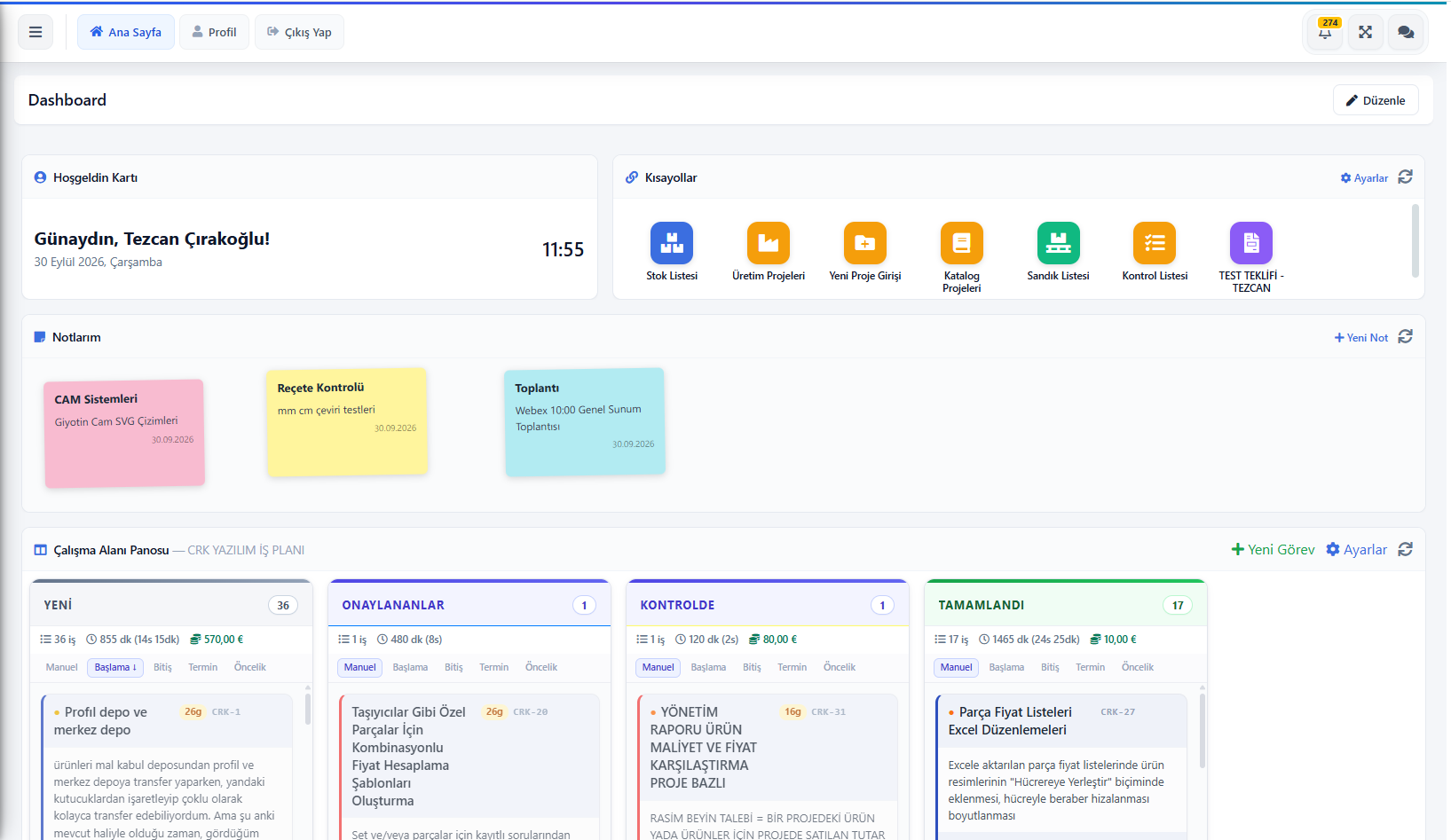
TCRK XERP dashboard: shortcuts, notes and Kanban task board

The TCRK XERP Collaboration module brings Kanban-style task boards, real-time internal chat and notifications into the ERP; teams work together by sharing quotes, projects, stock cards or invoices directly in chat.

Kanban tasks

Workspaces, columns, WIP limits.

Internal chat

One-to-one and group, files and reactions.

Record sharing

Invoices, projects, stock, customers in chat.

Notifications

Personal notification settings, instant alerts.

Tasks

Your team's work on one board.

Kanban boards are set up in workspaces with columns, WIP limits and per-member column permissions. Tasks are tracked in board, table and calendar views; changes are reflected for everyone in real time.

  • Board, table and monthly/weekly calendar views
  • Priority, due date badges and aging
  • Checklists, comments, @mentions, attachments, Markdown notes
  • Change history, rejection reasons, duplication and moving between workspaces
  • Cost tracking with hourly rates and export to Excel
Chat and notifications

The conversation sits next to the record it's about.

One-to-one and group chats with files, reactions and read receipts. Online, busy and away statuses are visible. A quote, manufacturing project, stock card, customer, supplier or invoice can be shared into chat in one click.

  • One-to-one and group chats, in a separate window
  • File sharing, reactions, read receipts
  • Online status indicator
  • Sharing ERP records in chat
  • Notification list and personal notification settings
Screens

What's in this module?

1

Task Board

Summary task dashboard.

2

Workspaces

Columns, members, WIP limits.

3

My Tasks / My Requests

Assigned to me and opened by me.

4

Chat

One-to-one and group chats.

5

Notifications

Notification list and settings.

6

Notes and Shortcuts

Personal dashboard widgets.

Place in the chain

The communication that ties the chain together.

A technical question on a quote, a missing material on a project, a change to a shipment: the relevant record is linked to the chat or task, so no information gets lost.

Follow the journey of a sample 4×6 pergola
Frequently asked questions

Common questions

Are task boards updated in real time?

Yes. Task and chat changes appear instantly on the screens of all relevant users.

Can I share ERP records in chat?

Yes. Records such as invoices, manufacturing projects, stock cards, customers, suppliers and orders are shared in chat as linked cards.

Live demo

Draw your pergola. Price and bill of materials follow on their own.

In a 30-minute online demo we'll show XERP 3D and TCRK XERP working as One Chain — with your own product family.

Book a Live Demo