Module 01 · TCRK XERP

Sales & CRM

What sales promises, the factory must be able to build. Manage quotes, customers, approvals and orders in one sales process — the right product, options and price, the first time.

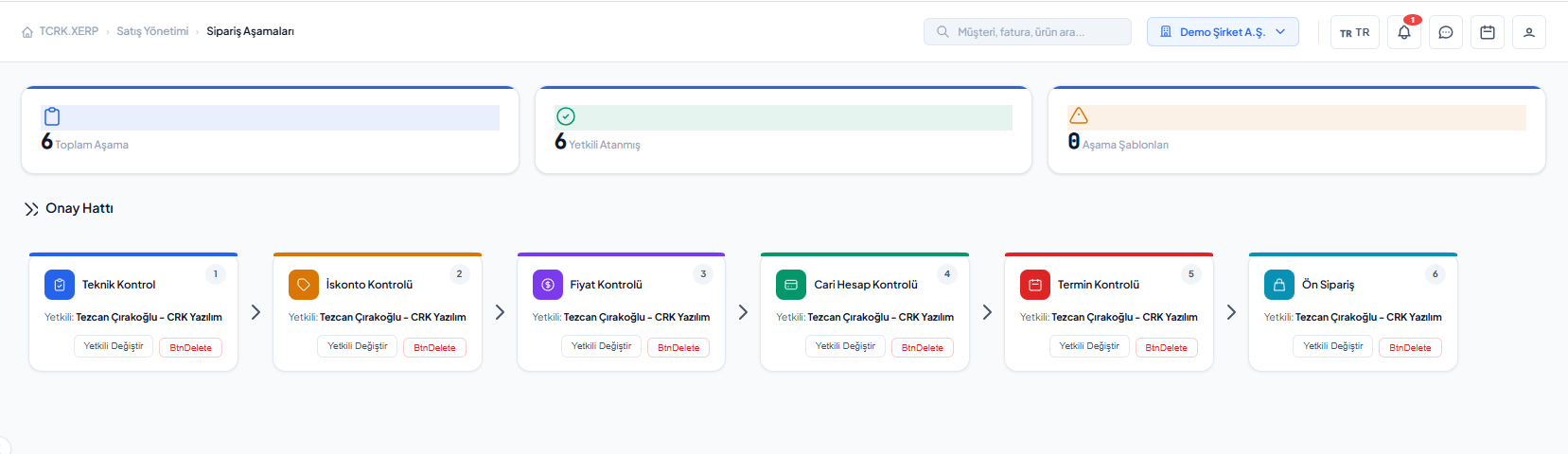
Order stages: technical, discount, price, customer account, due date and pre-order approval line

The TCRK XERP Sales & CRM module brings together a quick quote wizard driven by product questions, width × projection price catalogs, formula-based pricing, configurable approval stages and quote-to-order conversion on a single screen for pergola and bioclimatic pergola manufacturers.

Quick quote

Family → brand → series → product → questions; instant result from the price catalog.

Rule-based pricing

Price tables, parameters, exchange rates and C# price formulas.

Approval stages

Technical, price, discount, customer account, due date and pre-order approvals.

Templated PDF

Code-designed quote PDF templates tailored to your company.

Quote preparation

The right product, the right options, the first time.

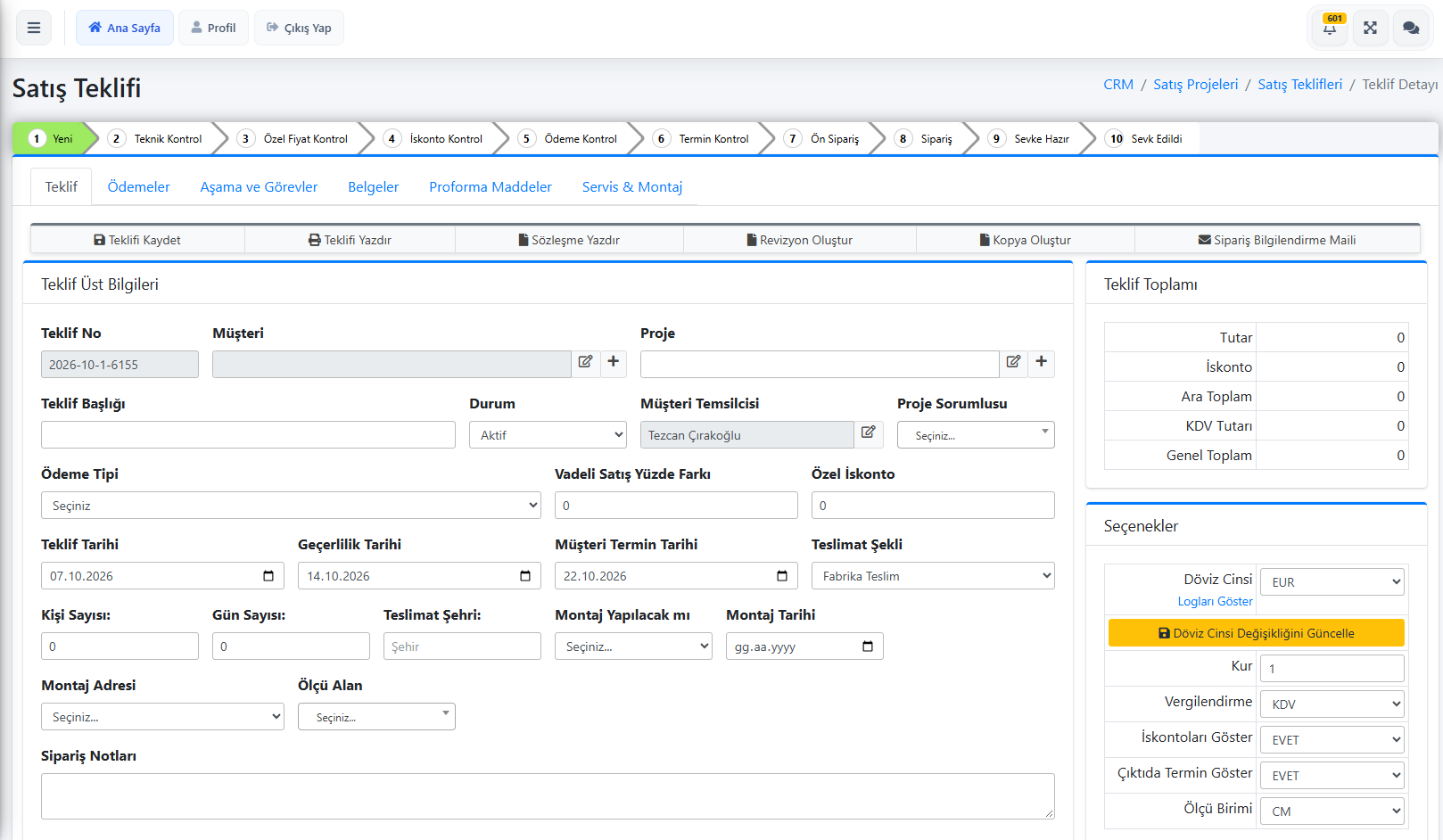
Quote lines are grouped as products, options and extra parts. Each line's product questions are answered; "Create drawing" stores a 2D/3D drawing of the product together with the line.

  • Fast selection through the family, brand, series and product hierarchy
  • Line-level product questions and linked options
  • Customer, project owner, validity and due dates
  • Multiple currencies with totals broken down per currency
  • Taxation excluding VAT, including VAT or with customs duties
  • File attachments and order notes
Product questions and quote lines in the quick-quote wizard
Pricing

Your price tables and formulas become the software's rules.

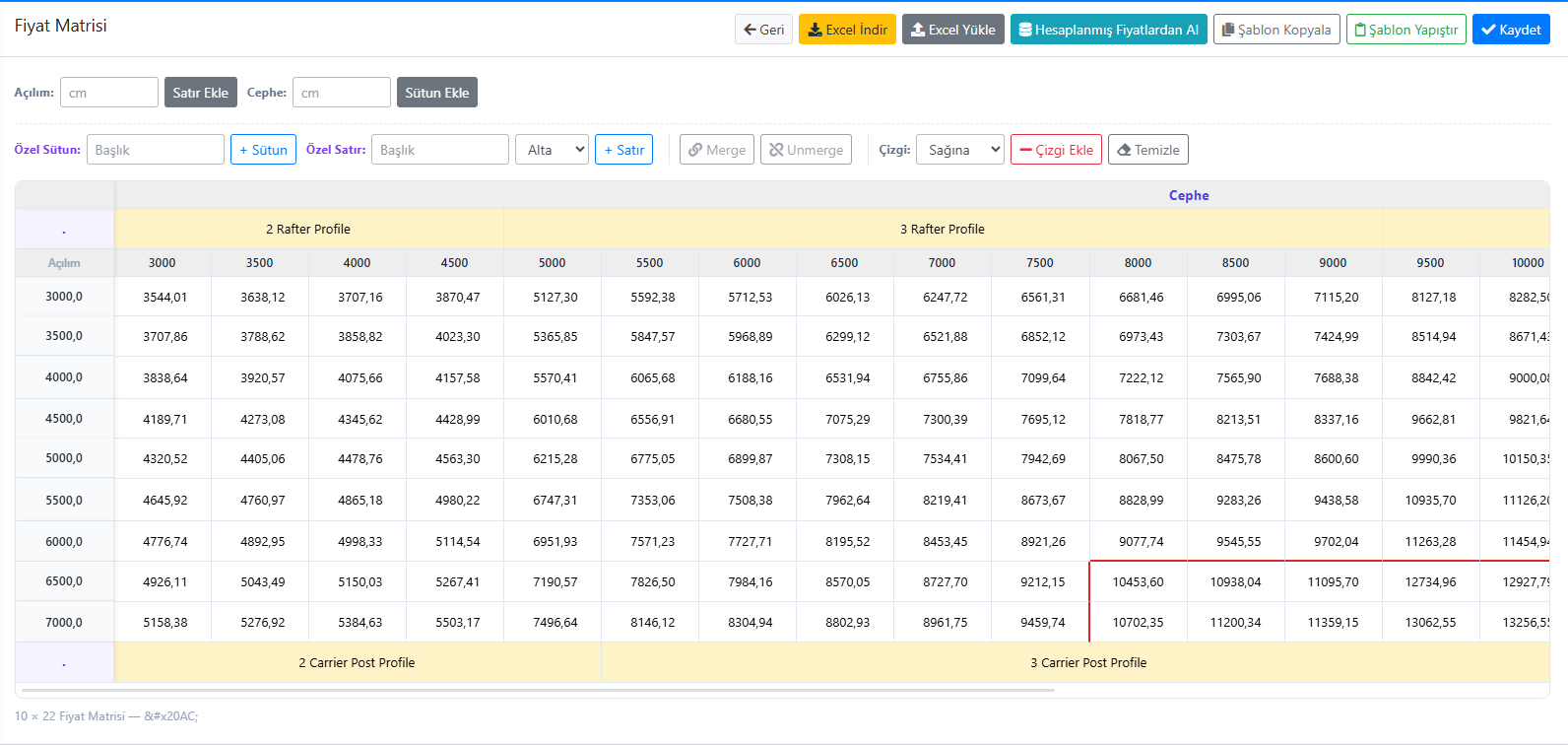
Price catalogs are kept as width × projection matrices and imported from or exported to Excel. For complex pricing, product-specific C# price formulas and CRM automations can be written.

  • Width × projection matrix price catalogs, filterable by family/brand/series
  • Bulk price updates via Excel
  • Dynamic pricing with exchange rates and price parameters
  • Product-specific C# price formulas and automations that run on save
  • When integrated with TCRK XERP, the same pricing rules can be used in XERP 3D
Price catalog with a width × projection matrix
Approval and orders

You decide who approves what.

You define the order stages yourself; each stage has an authorized approver. Once a quote passes all stages, it becomes an order and is ready for manufacturing.

  • Stage types: technical, price, discount, credit risk, due date and pre-order
  • Pending approvals inbox, with files and notes per stage
  • Withdrawal requests and reverting an order back to a quote
  • Unsent / sent quote lists
Screens

What's in this module?

1

Quick Quote

Wizard-based product selection, questions and price preview.

2

Quote List

All quotes, with unsent and sent views.

3

New Quote

Detailed quotes with products, options and extra parts.

4

Pending Approvals

Approve and reject inbox by stage.

5

Orders

Quotes that have passed all approvals, with files.

6

Order Stages

Define your approval flow and approvers.

7

Price Catalogs

Matrix price tables, Excel import/export.

8

Quote Templates

Code-designed PDF quote templates.

9

Customers

Customer cards, account and quote history.

Place in the chain

Where the chain begins.

The drawing from XERP 3D is priced and approved here. The approved order moves to the Manufacturing module together with its answers, and the BOM is generated automatically.

Follow the journey of a sample 4×6 pergola
Frequently asked questions

Common questions

How is a pergola quote prepared in TCRK XERP?

In the quick quote wizard you select the product family, brand, series and product, then answer product questions such as width, projection and color. The price is calculated instantly from the price catalog and defined formulas, and the quote can be exported as a PDF.

Can I import my price catalogs from Excel?

Yes. Width × projection matrix price catalogs are imported from and exported to Excel, and can be filtered by family, brand and series.

Can I change the approval stages?

Yes. On the Order Stages screen you define stages such as technical, price, discount, customer account, due date and pre-order in any order you like, and assign an approver to each.

Can we design the quote PDF to match our corporate identity?

Yes. Quote templates are designed in code; logo, colors, page layout and content can be fully tailored to your company.

Live demo

Draw your pergola. Price and bill of materials follow on their own.

In a 30-minute online demo we'll show XERP 3D and TCRK XERP working as One Chain — with your own product family.

Book a Live Demo