One Chain · Example scenario

Follow a pergola's journey with CRK.

Follow the same 4×6 bioclimatic pergola through eight steps: from the moment it is drawn in front of the customer to the moment it is crated and delivered. Each step starts with the data of the one before; nothing is ever typed twice.

One Chain is what happens when XERP 3D and TCRK XERP run together: the 3D drawing is priced automatically, the approved order is transferred to manufacturing with an automatic bill of materials, and the whole process is managed in a single data flow until shipment is complete.

Sales · Step 1 / 8XERP 3D

Design

The sales rep draws a 600 × 400 cm bioclimatic pergola in XERP 3D, right in front of the customer.

The product series is selected; width, projection, height and color questions are answered. LED and motor are ticked, a zip screen goes on the front opening and glass on the sides. The customer sees the result on a tablet in photorealistic presentation mode, or in AR at true scale in their own garden.

What happens automatically here
  • All profiles, parts and glass panels are recalculated to size
  • Zip screens and glass fit the openings automatically
  • Every change is saved automatically
Explore XERP 3D
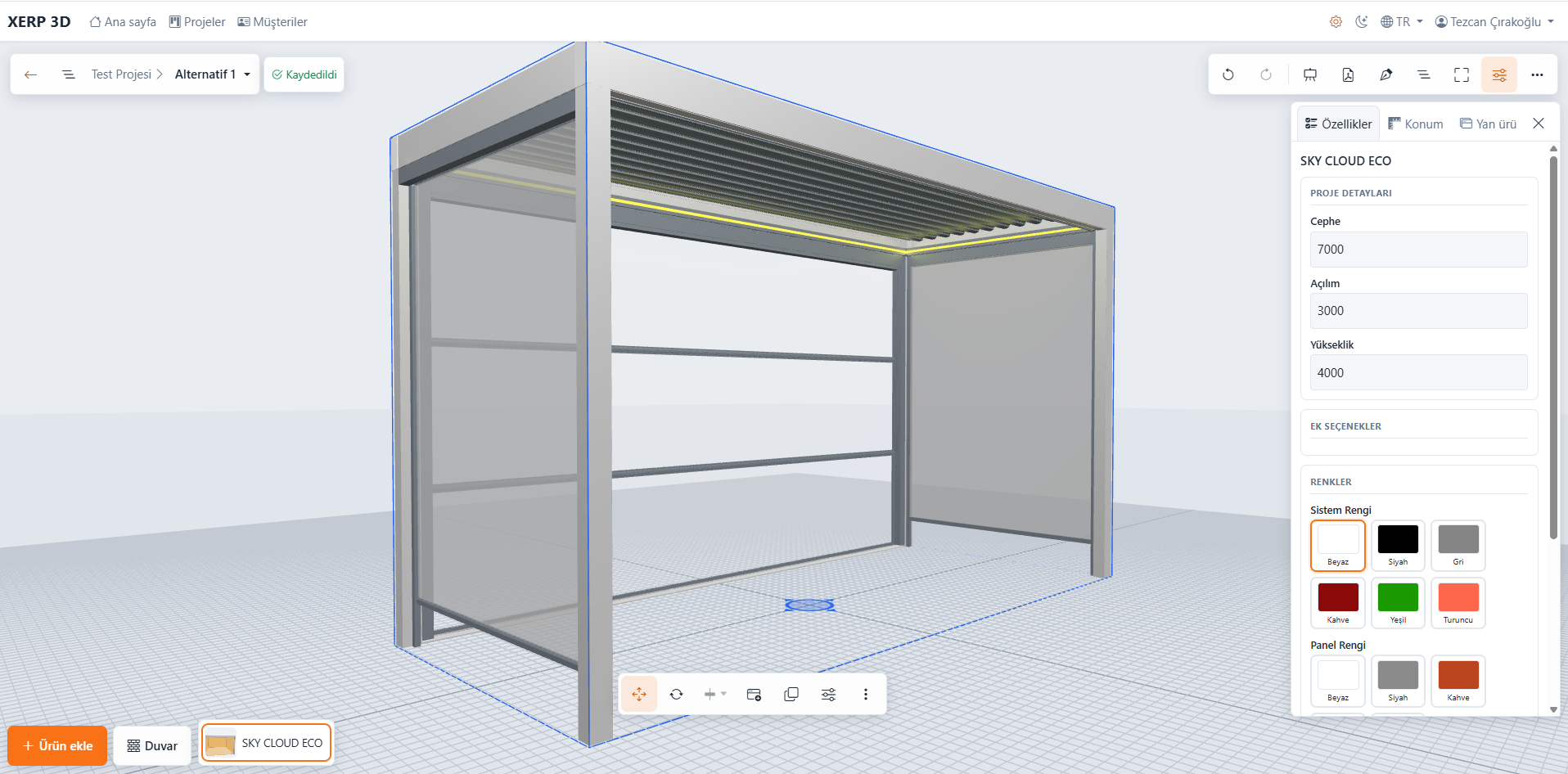
4×6 bioclimatic pergola in the XERP 3D project scene: LED, zip screen and side glass
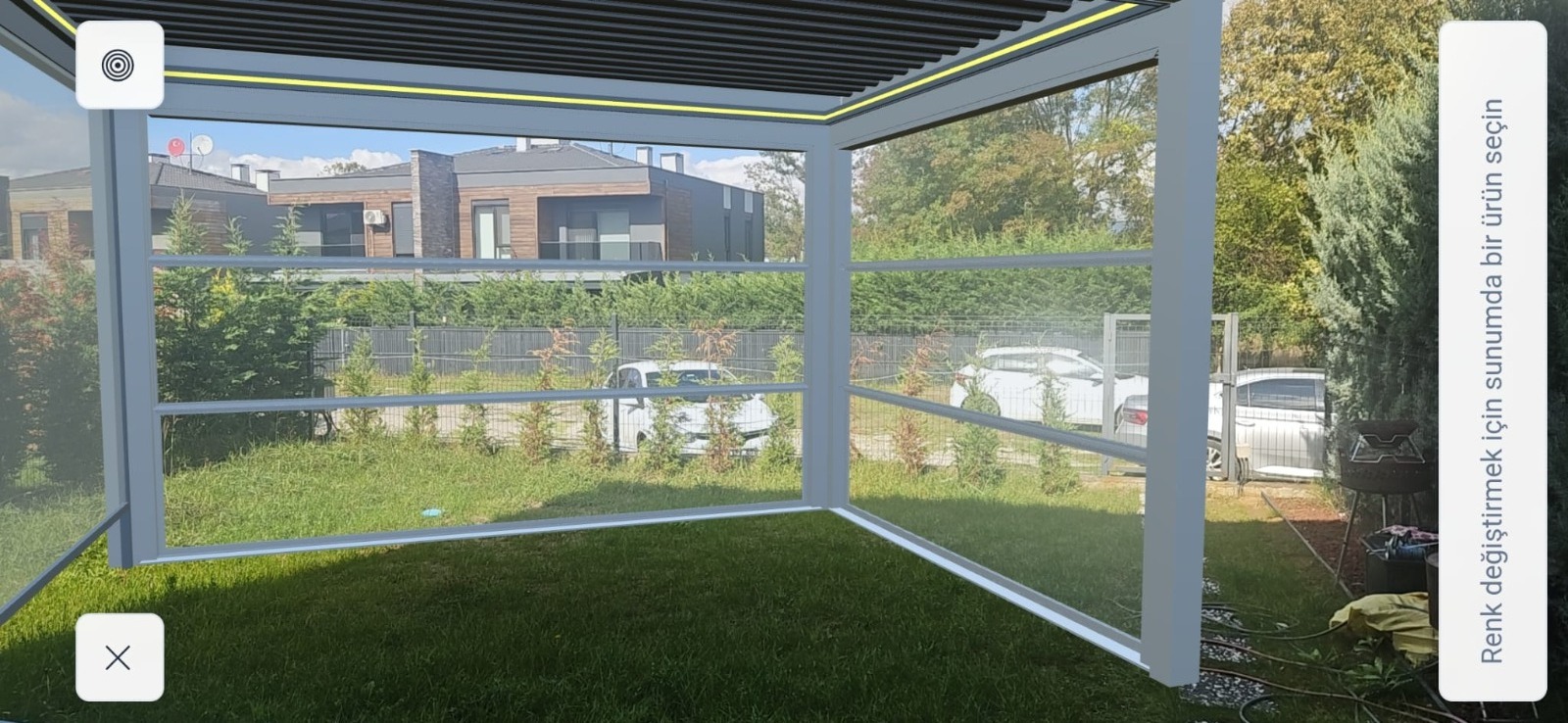
The same pergola in a garden, shown in augmented reality on a phoneAR
Sales · Step 2 / 8XERP 3D

Price

The moment the drawing is done, the price is ready too.

The price is calculated from the price catalogs you uploaded to XERP 3D, based on dimensions and selected options; when integrated with TCRK XERP, the ERP's catalogs and formulas can be used as well. If the customer drops the zip screen and asks for glass instead, the price updates on the spot.

What happens automatically here
  • Main product, zip screen, glass and LED lines are priced separately
  • Changes to dimensions and options hit the price instantly
  • Discounts and multi-rate VAT are applied
Explore pricing
Sales · Step 3 / 8XERP 3D

Quote

A professional PDF quote with images and selected features — in the same meeting.

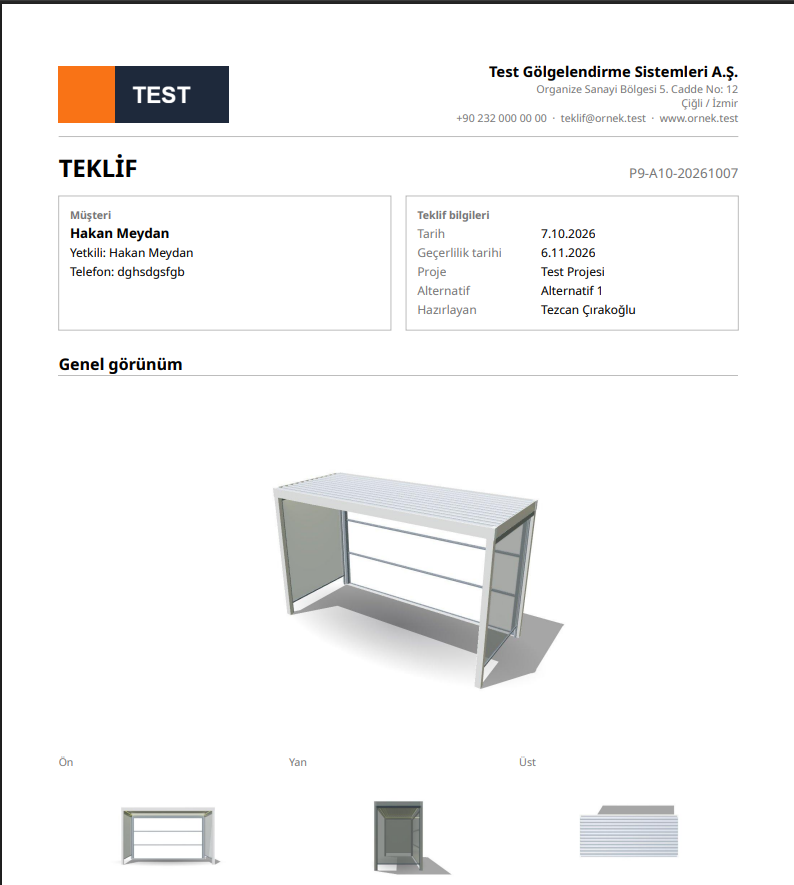
A quote with your company logo: general, front, side and top views of the pergola, the selected options, zip screen and glass as sub-lines, a price summary, payment, delivery and warranty terms, and signature fields. The quote is generated in the customer's language.

What happens automatically here
  • View images are captured automatically from the scene
  • Every selected option is written into the quote
  • Turkish, English or Spanish
Explore the PDF quote
PDF quote for the 4×6 pergola generated by XERP 3D
Order · Step 4 / 8XERP 3D · TCRK XERP

Take the order

When the customer says yes, the quote becomes an order.

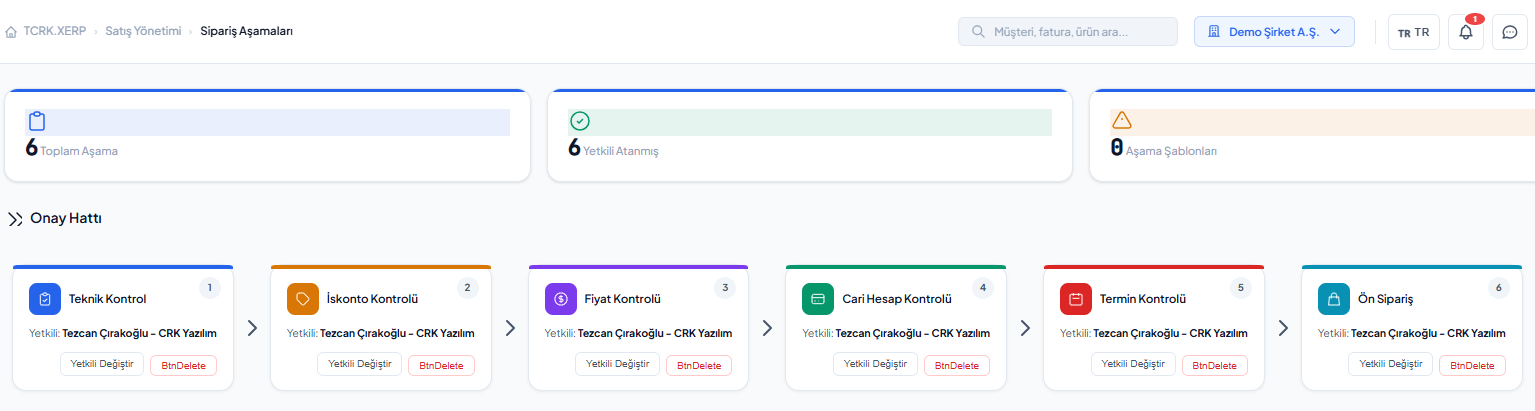
In XERP 3D the project is marked as approved. When integrated with TCRK XERP, the quote passes technical, price, discount, customer account and due-date approvals and becomes an order carrying all of the drawing's data.

What happens automatically here
  • Drawing, dimensions and options carry over to the order unchanged
  • Each approval stage lands in the right approver's inbox
  • The approval history is stored with the order
See approval stages
Approval stages of the 4×6 pergola order
Production · Step 5 / 8XERP 3D · TCRK XERP

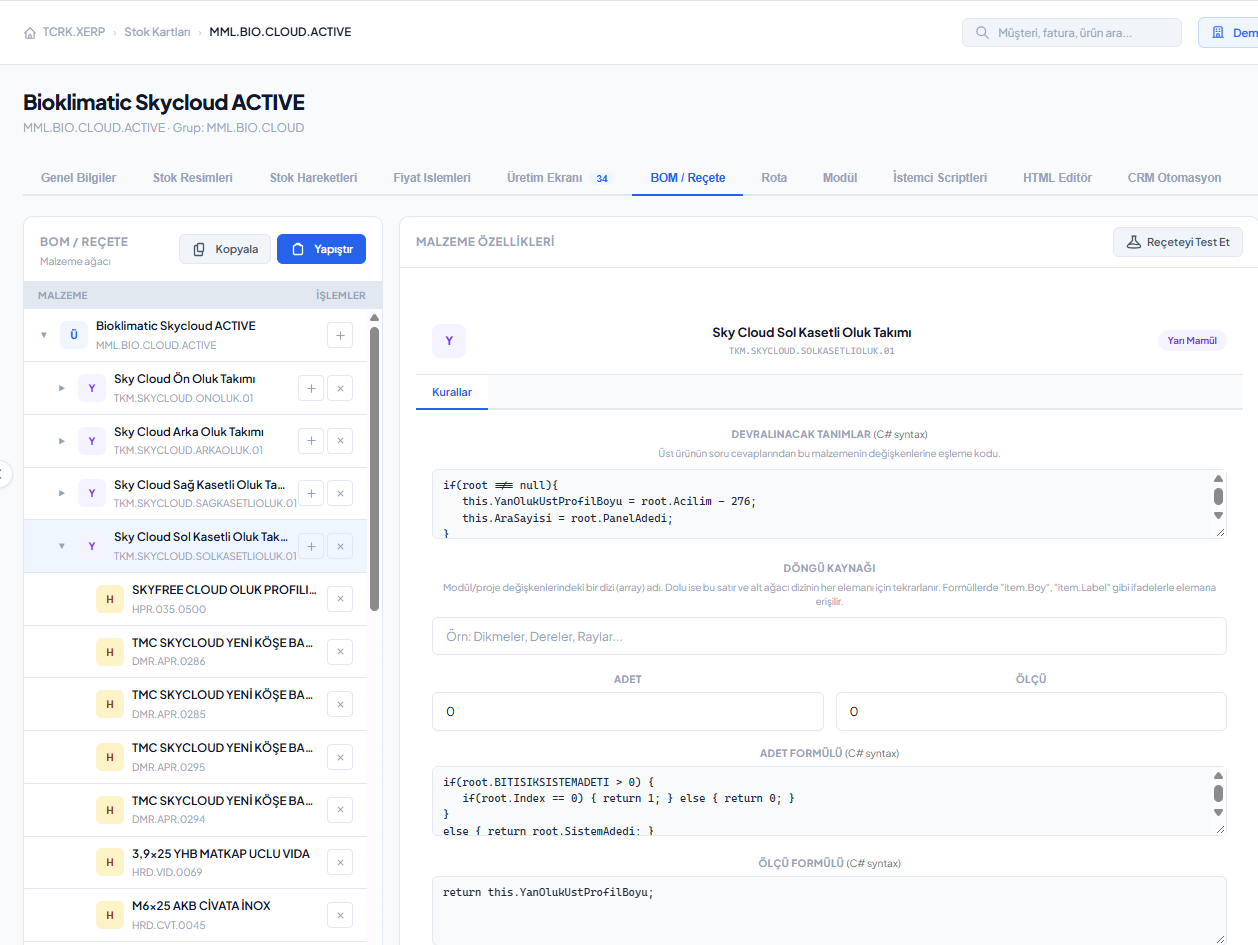
Build the BOM

The technical office doesn't redraw a pergola that's already sold; the BOM builds itself.

The 600 × 400 cm size and selected options run through the product's defined BOM and become a multi-level material list: gutter and beam profiles, louvers, LED, motor, zip screen and glass components, with quantities and lengths. The cut list is optimized. On its own, XERP 3D exports this BOM and cut list to Excel/PDF; in TCRK XERP, a manufacturing project is opened.

What happens automatically here
  • Material needs and cut list generated automatically
  • Cutting optimization for minimal waste
  • Workstation routing and work orders are prepared in TCRK XERP
Explore the automatic BOM
Automatically generated BOM for the 4×6 pergola order
Production · Step 6 / 8TCRK XERP

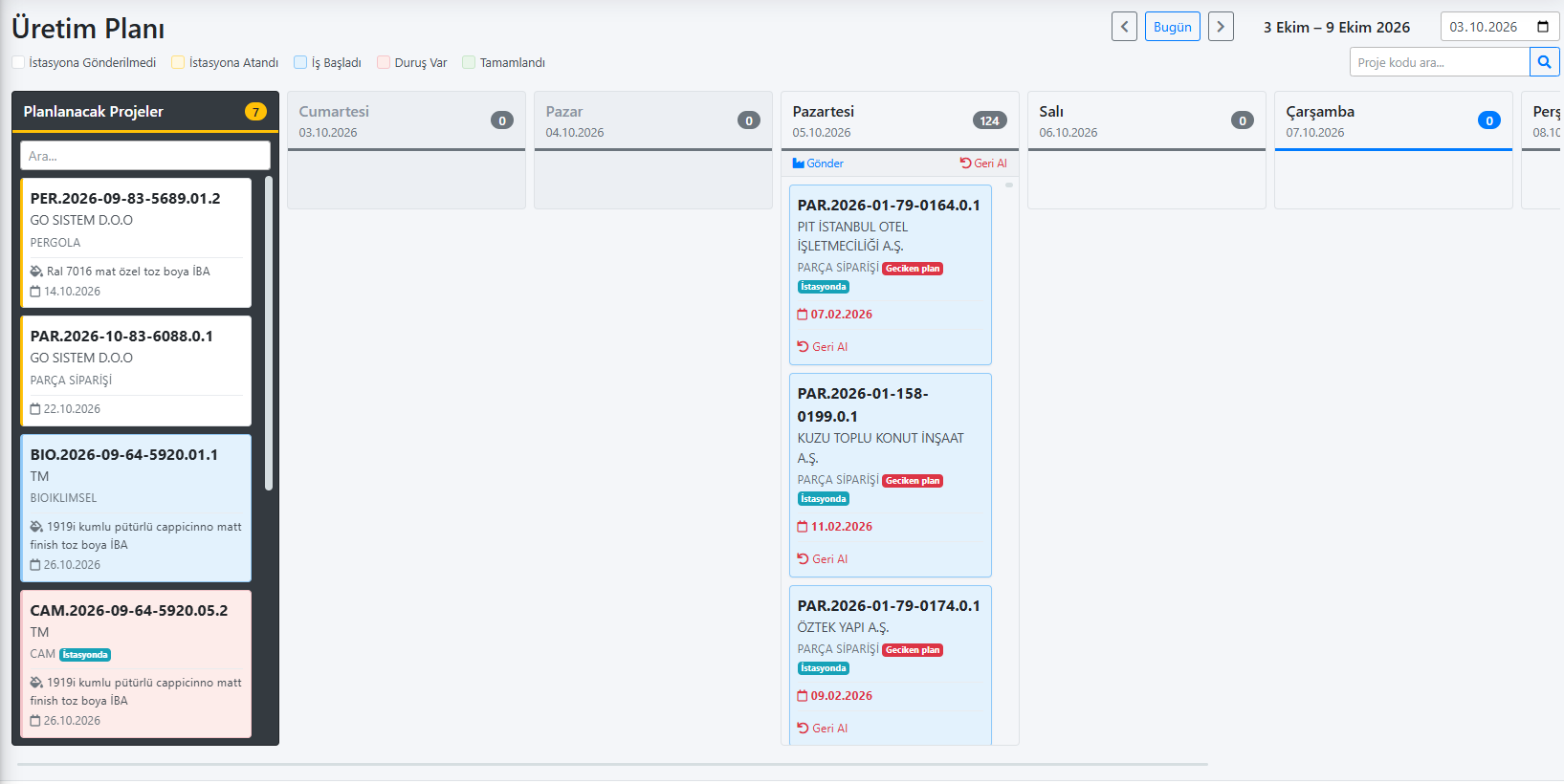
Plan production

The pergola's work orders are distributed to workstations and scheduled against the due date.

The project passes technical review and goes into the weekly plan. On the production planning screen, cutting, welding, painting, assembly and packing work orders appear on a Gantt chart; workstation times are calculated from the product's dimensions.

What happens automatically here
  • Workstation times are calculated from dimensions
  • You see which workstations are overloaded
  • Orders with approaching due dates rise to the top
Explore planning
Gantt production plan for the 4×6 pergola project
Factory · Step 7 / 8TCRK XERP · Tablet

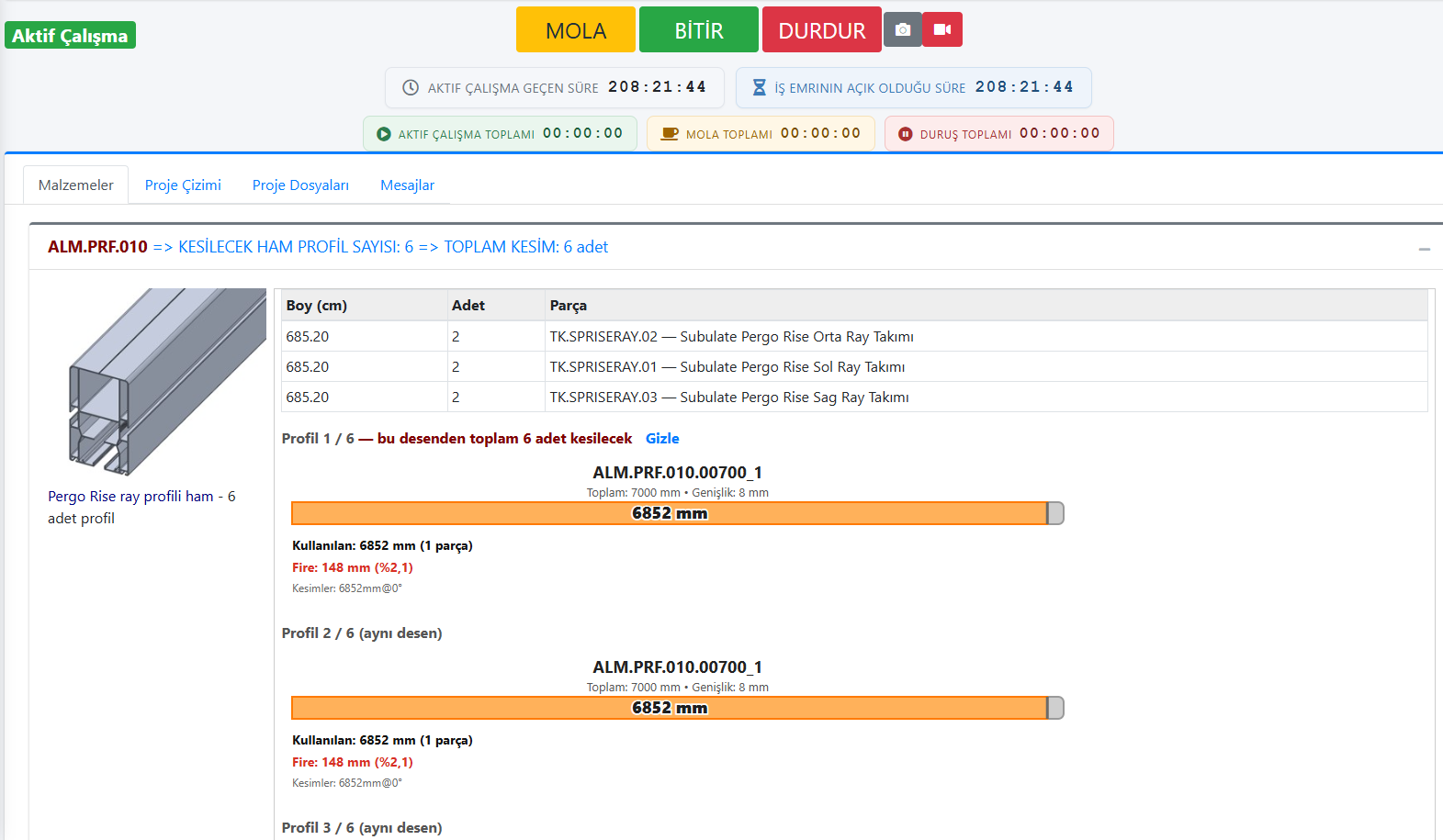
Produce on the shop floor

Every workstation sees this pergola's own work order on its tablet.

The cutter sees profile lengths; the assembler sees the product answers and the material list. They start the job, take a break, resume and finish. The office doesn't ask "where's that pergola?" — the system shows it.

What happens automatically here
  • Real times from start, break, resume and finish records
  • Project status updates instantly on the management screen
  • Labels are printed with barcodes and QR codes
Explore Shop-Floor Tablets
Work order for the 4×6 pergola on a workstation tablet
Shipping · Step 8 / 8TCRK XERP · Tablet

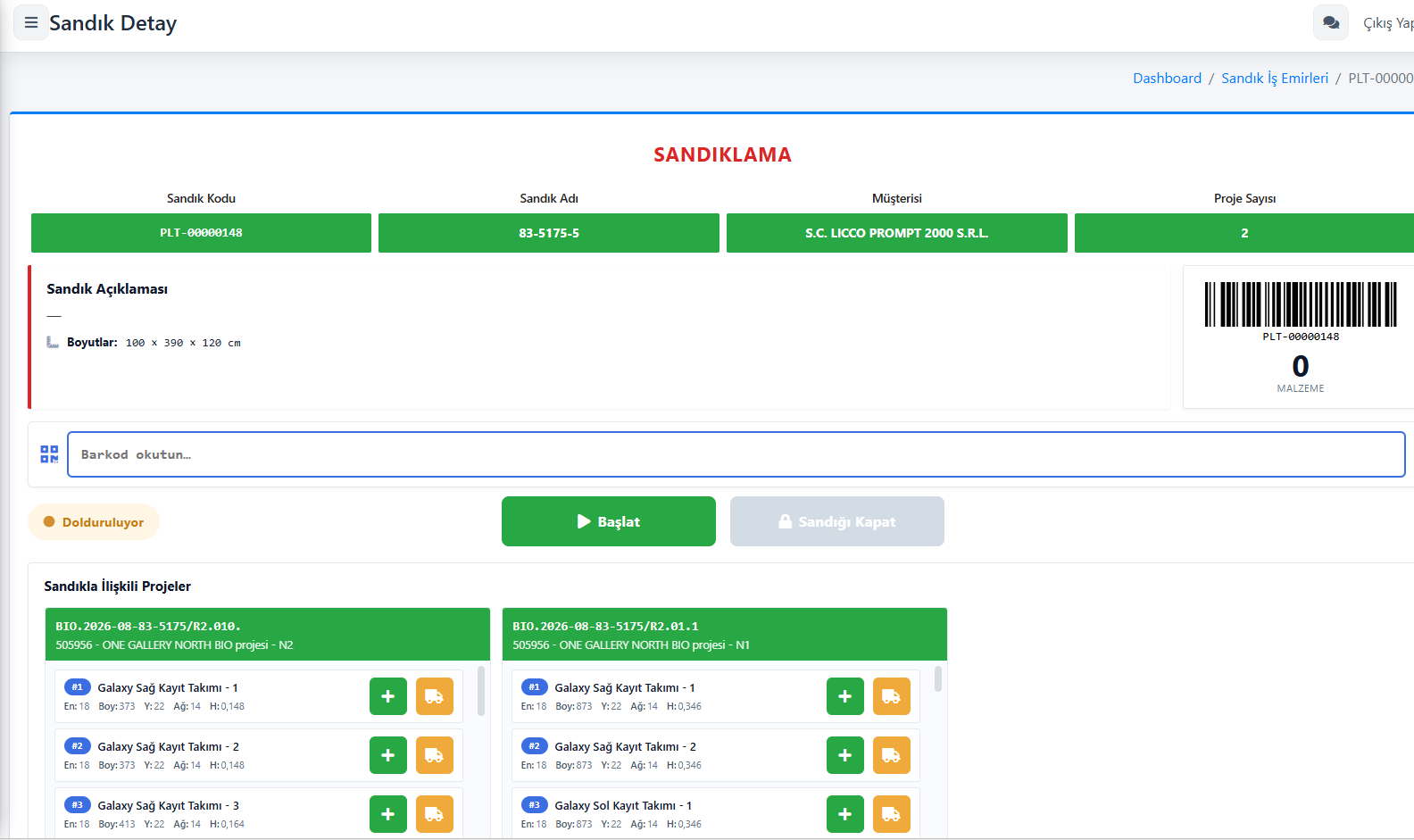
Crate and ship

The pergola's packages are crated, loaded and delivered.

Packages are added to the crate by barcode; if needed, they share a crate with another project for the same customer. Loading is done on a tablet, and with the delivery note the project becomes "Shipped". The chain that started with a drawing closes here.

What happens automatically here
  • Crate contents come straight from the project
  • Loading steps are recorded on the tablet
  • The project closes on delivery
Explore shipping
Crating screen for the 4×6 pergola on a tablet

The same pergola. The same data from start to finish.

Together or separately

What you gain in each scenario

XERP 3D runs sales, quoting and the technical office on its own; TCRK XERP runs production. The complete chain is formed when both run together.

Step XERP 3D only TCRK XERP only Together (One Chain)
3D design, presentation, render, AR ✔ Basic 2D/3D drawing ✔ Full 3D experience
Price calculation ✔ From your own price catalogs ✔ With catalogs and formulas ✔ Automatic from the drawing
PDF quote ✔ In 3 languages ✔ Template-based ✔ With images, in 3 languages
Stock cards and product questions ✔ Definitions ✔ Definitions + warehouses and stock movements ✔ Shared definitions
Automatic BOM and cut list ✔ Excel / PDF ✔ In the manufacturing project ✔ From drawing to manufacturing
A3 technical drawing with title block ✔ DXF / PDF — ✔
Approval stages and order Project statuses ✔ ✔ With drawing data
Planning, shop-floor tablets, live production tracking — ✔ ✔ In one chain
Crating, shipping, purchasing, finance — ✔ ✔ In one chain
What the chain removes

No re-typing. No lost information.

Manual pricing

Prices are calculated with your rules from the real sizes and options in the drawing.

Excel BOMs

Material and cut lists come straight from the product's defined BOM.

Paper work orders

Work orders land on workstation tablets and times are recorded in real time.

“Where is my order?” calls

One screen shows which workstation every project is at.

Incomplete shipments

Crate contents and loading steps are checked on a tablet.

Disconnected systems

Sales, production, purchasing and finance share one database.

Frequently asked questions

Common questions

How does One Chain work, from drawing to shipment?

A pergola drawn in XERP 3D is priced instantly from its dimensions and options and turned into a PDF quote. When the order is approved, the bill of materials and cut list are generated automatically from the same data; a manufacturing project opens in TCRK XERP, work orders are planned and sent to workstation tablets, and everything is tracked on the same project until shipment is complete.

Do I have to build the BOM by hand when an order is approved?

No. The BOM tree you define once on the stock card runs automatically for every order using the product answers and quantity and dimension formulas. Material needs, cut list and workstation routing are generated on their own.

Where do the prices come from?

When XERP 3D is used on its own, prices are calculated from your own price catalogs uploaded to XERP 3D. When integrated with TCRK XERP, the ERP's price catalogs (width × projection matrices), price parameters, current exchange rates and, if you wish, C# price formulas can be used as well.

My factory's workstations and routings are different — can it adapt?

Yes. The number of workstations is not fixed; you create as many as you need and define your own routing and duration algorithm for each product.

Can I start with XERP 3D only and add the ERP later?

Yes. XERP 3D can be used on its own for sales and quoting; when TCRK XERP is introduced, the chain is completed on the same product definitions and customers.

Live demo

Draw your pergola. Price and bill of materials follow on their own.

In a 30-minute online demo we'll show XERP 3D and TCRK XERP working as One Chain — with your own product family.

Book a Live Demo